Probed domains
See where engines scoped searches before grounding - owned versus third-party. Each domain shows appearances, prior-period comparison, intensity change, and the engines that probed it, with an Owned badge on your own hostnames.
We now support Meta Muse Spark. Track your Spark prompts
See the internal searches AI engines run while answering your tracked prompts. Rankscale ranks those fanout queries, trends activity over time, shows which domains get probed, and surfaces the phrases, concepts, and words engines added versus your prompts.
Rank tracking tells you whether you appeared. Citations tell you who got credited. Query Fanout shows the searches the engine ran to decide.
You only see the finished AI answer, so the retrieval work that produced it stays invisible.
Rankscale records the internal searches issued for each tracked prompt and rolls them up across Brand Details.
Citation reports show who was credited, but not which domains were probed and dropped.
Probed domains, wins, and losses show where your site was searched for, found, or skipped before the citation list was written.
Keyword research guesses what people type into Google, not what models search while answering.
Appendix signals and new fanouts surface the phrases, concepts, and queries models added on top of your tracked prompts.
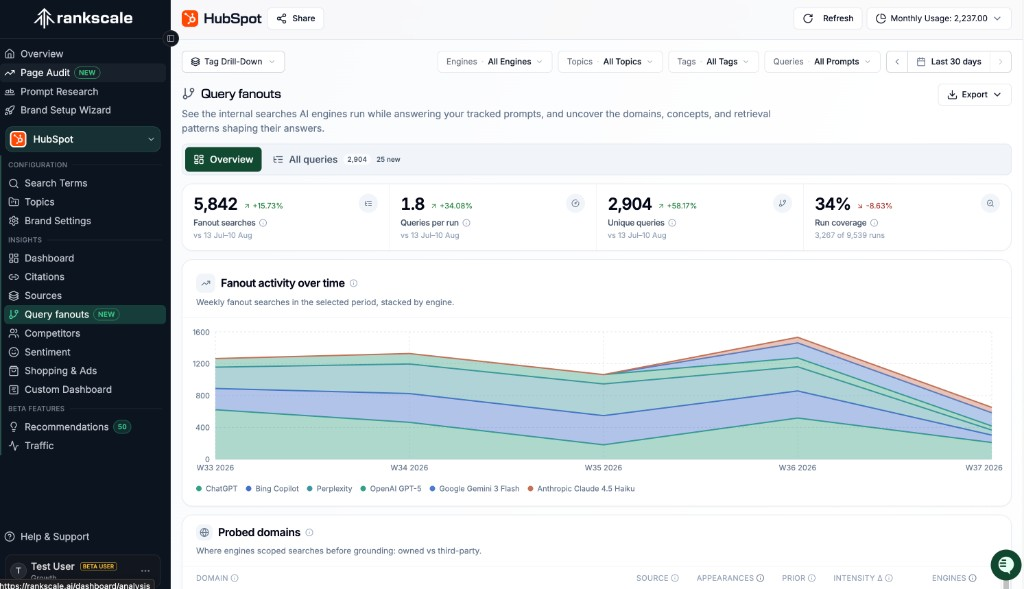
Overview opens with Fanout searches, Queries per run, Unique queries, and Run coverage, each with a period-over-period change. Fanout activity over time stacks those searches by engine so you can see which models are probing.
Appendix signals extract Exact Phrases, Associated Concepts, and Words engines added versus your tracked prompts. Click a phrase, pair, or word to filter All queries to the fanouts that used it.
See which hostnames engines scoped with site: or a slot, including an Owned badge on your domains. Wins and losses split high- versus low-detection fanouts. New fanouts and shifting probes flag queries that appeared this period or whose probe set changed run to run.
Probed domains, wins and losses, and appendix signals - the exact views on the Brand Details Query fanouts tab, captured in the screenshots below.
See where engines scoped searches before grounding - owned versus third-party. Each domain shows appearances, prior-period comparison, intensity change, and the engines that probed it, with an Owned badge on your own hostnames.
Fanouts where you show up strongly versus rarely appear. Wins list high-detection queries with your rank; losses expose the fanouts where detection is 0% - your clearest content gaps.
Exact phrases, associated concepts, and words engines added versus your prompts, each with occurrence counts. Click any chip to filter All queries to the fanouts that used it.
Turn the hidden retrieval step into reporting you can act on: coverage trends, the extra words models searched for, probed domains, and a full query inventory.
Appendix Words, Exact Phrases, and Associated Concepts are not a dead word cloud. Each chip opens All queries filtered to the fanouts that added that token.
Every All queries row links back to the tracked prompts that produced it, so you can open the exact search term instead of guessing which query drove the probe.
Include Query fanouts on a share link the same way you include Citations or Competitors. Engine, topic, tags, and date range apply as they do on Citations and Sources. Export stays off in shared mode.
“Finally an AI visibility tracking software that skips the fluff and shows the data underneath - instead of just shiny graphs without the ability to go deep on single queries, citations and sentiment.”
CEO & Founder, Zeitdice
Explore more ways to monitor and improve your AI visibility.
Common questions about Query Fanout on Brand Details and how it relates to citations, sources, and plan access.
Query Fanout shows the internal web searches AI engines issue while answering your tracked prompts. Rankscale rolls those fanout queries up across Brand Details so you can see coverage, probed domains, wins and losses, new and shifting fanouts, and appendix signals, then open the full All queries table.
Still have questions? Contact our team
Start free, upgrade when you need more.