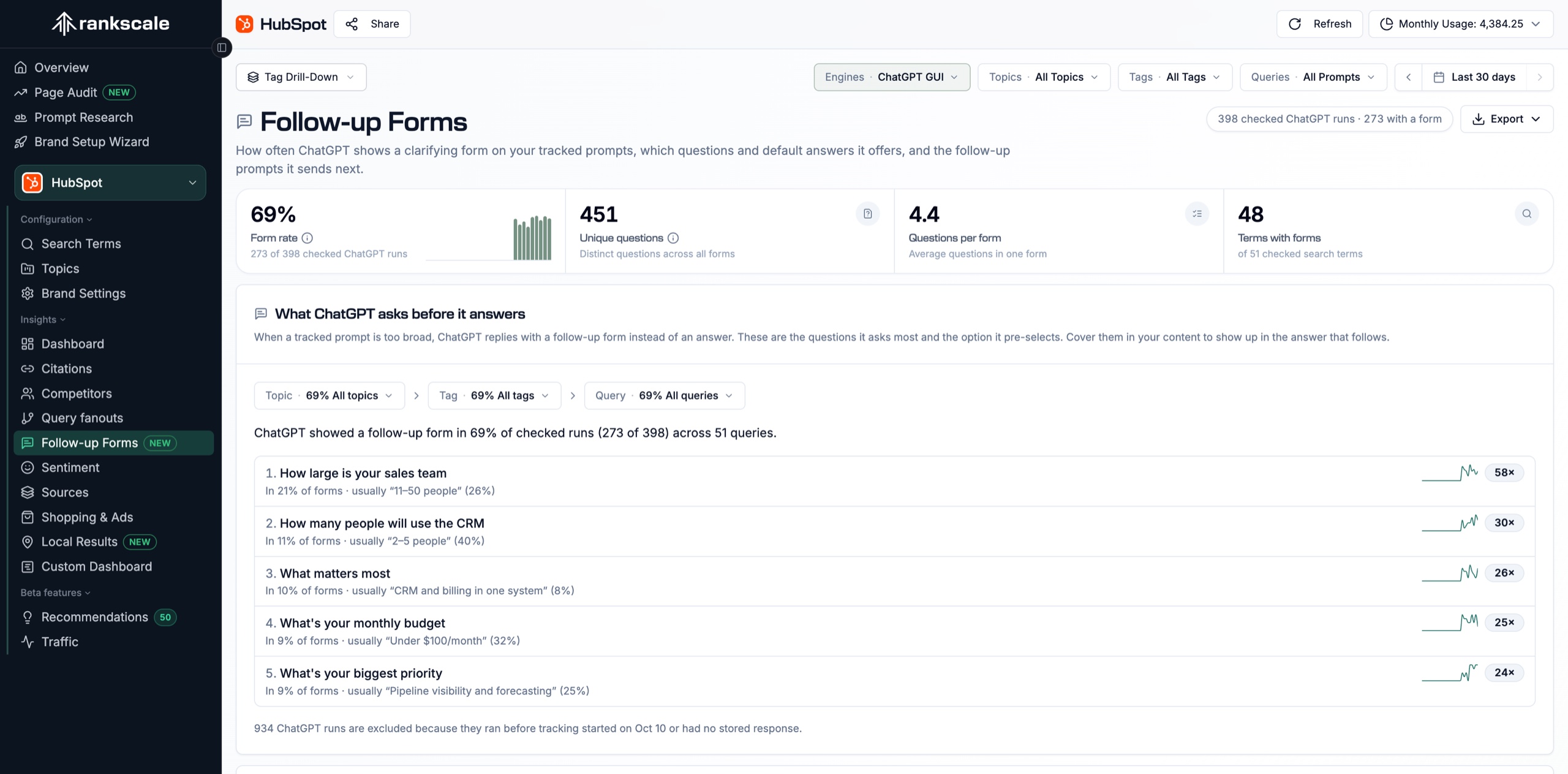
Top follow-up questions
Every clarifying question with how often ChatGPT asked it, its share of forms, the answer it pre-selects most, and a trend line. Search across questions and options, then click a row for details.
We now support Meta Muse Spark. Track your Spark prompts
For many prompts, ChatGPT asks clarifying questions before it recommends brands. Rankscale captures every follow-up form on your tracked ChatGPT runs and shows which questions get asked, which answers ChatGPT pre-selects, and how often your prompts trigger a form.
Rank tracking shows the brands ChatGPT named. Follow-up forms show the choices it asked users to make first, and which choice it made for them.
You track one prompt and assume every user gets the same answer.
Rankscale shows the clarifying questions that split that prompt into budgets, team sizes, use cases, and regions.
Prompt research guesses which refinements users add.
Follow-up prompt samples come straight from ChatGPT, so you can track the refined prompts it actually suggests.
Content targets a generic audience.
Pre-selected answers show which audience ChatGPT assumes by default, so your content can address it directly.
See the share of checked ChatGPT runs that returned a follow-up form, per day or per week, with a change versus the previous period. Filter by topic, tag, or prompt to find where ChatGPT asks most.
Clarifying questions are ranked by how often ChatGPT asked them, with the answer it usually pre-selects and a small trend line for each question.
Expand any question to see how often each option was shown and how often it was pre-selected. Follow-up prompt samples show the refined prompts worth tracking next.
Questions, answer options, and follow-up prompt templates - the exact views on the Brand Insights Follow-up Forms page, captured in the screenshots below.
Every clarifying question with how often ChatGPT asked it, its share of forms, the answer it pre-selects most, and a trend line. Search across questions and options, then click a row for details.
Expand a question to see every option ChatGPT offered: how often it was shown and how often ChatGPT pre-selected it as the default answer, next to the prompts that triggered the question.
The refined prompts ChatGPT sent after the form, with its pre-selected answers filled in. Add any of them to tracking in one click, or open the run it came from.
Turn ChatGPT clarifying questions into insight you can act on: which prompts branch, which answers ChatGPT assumes, and which follow-up prompts to track next.
Filter by topic, tag, and prompt to see which tracked prompts trigger forms most often and which questions they share.
Every prompt in an answer option list opens Search Term Details, and the recent run date opens the newest run that asked the question.
Add Follow-up Forms to a share link, place the follow-up question widgets on a Custom Dashboard, or pull the same numbers through the Metrics API and MCP server.
“Rankscale's precision in tracking generative search visibility and surfacing new opportunities makes it an essential part of my workflow today.”
SEO Expert
Explore more ways to monitor and improve your AI visibility.
Common questions about ChatGPT follow-up forms, form rate, and plan access in Rankscale.
For many recommendation prompts, ChatGPT now answers with a short questionnaire before it names brands, for example "What type of business do you run?" or "What is your monthly budget?". Each question comes with answer options, and ChatGPT often pre-selects one of them. Rankscale captures that form on every tracked ChatGPT run.
Still have questions? Contact our team
Start free, upgrade when you need more.